since 2000
How to Research a File Type
First, we'll assume that you actually used the FILExt search for information on the file you can't open. If not, see instructions on how to use FILExt.
Nobody can know everything so it's a certainty that there are many file types not listed in the FILExt database. When that happens you might have to search further to find the information you want. This page will offer some suggestions on doing that...
Using Internet Search Engines
Internet search engines can help you search for a particular file type to match an unknown file extension. First search on the full file name. If that does not yield any useful results consider using the search term: .ext file
Replace ".ext" above with the extension of interest and leave the word "file" with it for your search. This combination tends to produce useful results although you may have to scroll through hundreds in order to find something you can use. When the Google results show up tap the keychord Control-F and type the ".ext" part, with the period, into the search box and then let it find the various instances of the extension. You need to do this because Google's results will ignore the period but you usually want to find it. (Hint: When you click on a link to see if it's really what you want, right click on the link and open a new browser window or new browser tab. That way you don't have to reload the search results if it's not what you want.)
If a search of the Web comes up with no significant results don't forget to also search the newsgroups, forums, discord, etc. This is particularly true if the file might be a game-related file. Many Internet newsgroup discussions revolve around "cracking" various data files and/or converting the data from one format to another. Your particular file type just might be one of these and you'll find pointers to your answer in the newsgroup discussions and comments.
Use the context of the file
Where a file is located, how it was obtained, and the file's date and time can all be used as clues to the nature of the file. Consider these tips...
- Where and how did you get the file? The answer to these two questions can give you major clues as to the file's contents and what might be used to open it. If downloaded from the Web go back to the site where you got the file and look around for clues about the file. If necessary, write to the site's owner and ask them about the file.
- Where exactly is the file stored on your system? A computer's hard disk is usually organized like a filing cabinet. Files are stored in folders and the folders are organized according to their use. Folders found within the"Program Files" folder are usually programs and/or files necessary for the running of programs. So, files found there are usually associated somehow with the particular program represented by the folder the file is located in. Files in "My Pictures" are usually graphic files. And so on. Look at the full file name and the directory structure where the file is located and you can sometimes deduce what program that file works with or what type of program it is. Right click on the file and select Properties to see the file's location on the disk (you may have to click on the location and scroll to see the entire list of directories for the file).
- What were you doing when...? The date and time a file on your system was created, last modified and accessed are part of the Properties listing when you right click on a file and select that option. Think carefully about what you were doing at the time the file was created or last modified. You just might happen to remember and make a connection between a particular program and the file of interest. (This is a longshot, but worth considering if the other tips yield nothing.)
Examine the File with an Editor
FILExt has a whole page on looking into a file. A summary of the information is here.
Basically, you would be looking into a file to attempt to find some data in the file that gives a hint as to the proper association for the file. Lacking that, it might be possible to use the data found in the file to determine what sort of file it is and deduce the program association or, at a minimum, perhaps extract what's important to you in its raw form in order to use within some other program.
The FILExt Online File Viewer can help. There are also several programs that allow you to open any file type. For this summary FILExt will simply point you to the shareware program EditPad Pro (http://www.editpadpro.com/). When you open a binary file in EditPad Pro you see both the binary bytes and the ASCII equivalents. If you're lucky, when you do this on an unknown file you can often find hints about the file's creator. For example, if someone sends you a .PSPIMAGE file and you open it in EditPad Pro you might see...

Note that right at the top of the .PSPIMAGE file it tells you that the file was created by Paint Shop Pro and is an image file. Unfortunately, not all files are that easy to figure out. However, if you scroll through the file you just might find a copyright notice or some other indicator of what the file type is.
There are other possible indicators of a file's type, including the first several characters in the file for some file types (a few of these are listed on the more complete page about looking into a file).
Use TrID or Other File Identification Programs
TrId is a program that reads a file and compares its structure with a number of known structures. If a match is found you are presented with the alternatives. TrID is free and comes as a program you can load on your system or in an on-line version where you upload the file to their server for analysis there. [Note: With permission, FILExt uses the TrID data in its listings so TrID is best used to either narrow down your choices if a FILExt search results in multiple possibilities or if the file has no file extension (or might have the wrong one).
A similar product made by Forensic Innovations, Inc. would be FI Tools. This product has a trial version that might help in single-file circumstances or you can purchase a license for extended use.
Use Process Monitor
If the file is on your system and you don't know what made the file, you can perhaps find out using Process Monitor. Process Monitor will display and log all current activities on your computer. To use this tool for file type research you need to know that the file in question is being written while Process Monitor is running; so, this tool is only good for research if you have unknown files that are frequently updated or created as your computer is running.
When Process Monitor is running you will see an activity log being created as your computer runs. After a short period and/or when you know one of the unknown files has been created then stop the logging activity (Control-E) and then use the search function to search for the file's name. You may have to look at a number of entries to figure out what program or process created or wrote to the file. These logs can get very large and will continue to grow until you stop the logging so be certain to stop the logging before doing the search or the search itself will make the log grow faster than your search will run.
Post In A Forum
Search a forum for the purpose of asking questions. You can read past responses to questions there and, if you don't find an answer, you can post a new question. If you are asking about a particular file and how to read it, it would help if you post the first 256 bytes of the file along with your message (there is often useful information in that part of a file). There is a free tool called Minidumper which can help you do this and even provide the output in a format you can post directly into the forum message so all you have to do is Copy the output to your clipboard (actually just click on a button) and then Paste the results into your forum message. For example...
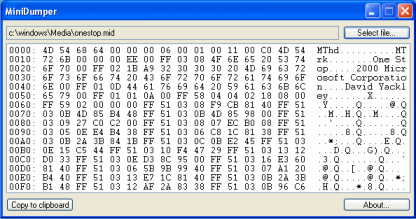
Other hints would be helpful. Like...
- What did you think it should be?
- If you got it by E-mail what did the sender say created it? (If not, ask.)
- If you found it on your system and are just curious where was it? What program was it with?
- Have you run it by TrID (online or offline if it's a large file)?
- What does the first part of the file consist of? (Run Minidumper.)
- And so forth.
Any information that might help would be useful in your post. A simple post that just says: "How do I open a ??? file?" is fairly useless is unlikely to yield an answer.
Try Other Extension Collections...
There are a large number of file extension collections on the Web. If the extension is not in the FILExt collection then it just might be in one of those.
When you find the answer...
...please don't forget to come back to FILExt if you find out more information about this file (particularly the program, the function of the extension, and the Web address for the program site). Others may be interested in that file type and you can help by submitting the information for inclusion into the database. Don't forget to bring the link where you found the information for your submittal. It helps a great deal when entering the data.