since 2000
How to Manage File Extensions
Normally, to manage extensions and their associations you would have to either edit the registry or open Windows Explorer and select "Tools|Folder Options|File Types" and work within that menu structure.
But, is there any utility designed for file extension management?
Yes, a product makes that all unnecessary. The product name is Associate This by Spearit Software. Associate This is a complete manager for file types; it also monitors file types and flags any programs trying to hijack any, allowing you to reverse the change; and it adds a function to your right click menu allowing you to select the program you want to open a file type for which you have multiple programs.
Alternatives...
If you are the hands-on type, there are programs that put a GUI front end on top of the registry editing procedure.
One is...
File Types Manager is a free program that puts a face on the registry entries controlling file type assignments. It also gives you some insight into what those mysterious CLSID entries are in your registry -- you know, the entries starting and ending in {braces} and containing seemingly random strings of characters. Using the program you can edit, add, or delete specific file type associations. However, to do so you really need to know something about what you are doing. You need to know just what values to enter into the various dialog boxes; if you don't you can make your computer unusable.
Before using any tools like these you might want to back up your registry just in case an error is made. Please see the discussion here...
https://support.microsoft.com/help/322756/how-to-back-up-and-restore-the-registry-in-windows
Warning!
Adding, deleting or changing file extension associations can have unexpected consequences.
Do any of these things at your own risk!
There are different procedures for different operating system versions. Each is described here.
Windows 11, 10, 7
Microsoft's current Windows version adds a graphic layer on top of the above and also adds a twist where you can, with one action, assign all file types a given program can open to be assigned to that program -- or, any portion of them.
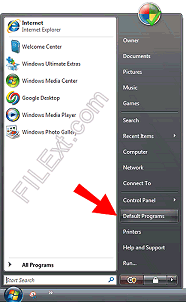
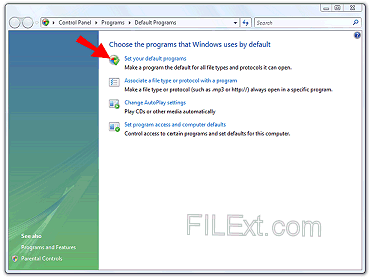
To do either of these use the Start menu (on Vista that's the button in the lower left with the Microsoft logo on it). In the right menu select Default Programs or Settings | Default Apps (in Windows 10). Then, depending on what you want to do, follow the sequence to the left (assign individual file extension associations) or to the right (assign total program default extensions).
Set individual file extension associations |
Set program default extension associations |
Setting individual file extension associations is performed using the second (Associate a file type or protocol with a program) option in the Default Programs dialog. When you select that, as with other versions of Windows, the operating system will pause, collect the information, and then display all current file extension associations.
To change an association, first select it. In this case the .aif extension is selected. Then, click on the Change program button. When you do that another dialog like the one below will open.
In this dialog you will see the programs that Windows recommends for association with the file extension but if the one you want is installed but not visible you can choose the Browse option and navigate to it to select it. Close everything and the new association takes effect. |
Setting the default associations for a program is performed using the first (Set your default programs) option in the Default Programs dialog. When you select that you will be presented with those programs Windows knows about which have multiple possible file extension associations.
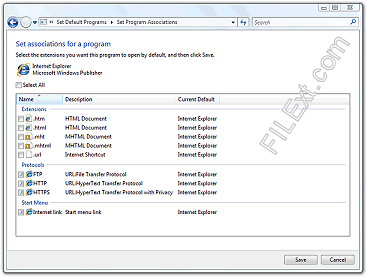
Select the program you want to work with. In this example, Internet Explorer is selected. Once selected a dialog like the one below will open.
Notice that this dialog shows the various file extensions that Internet Explorer can open as well as the protocols it can handle and the final option allows you to specify that Internet Explorer will show up on the Start menu list. You can select one or all of the checkboxes as your needs dictate. Not all of these will show up for all programs. Some programs, for example, do not handle any protocols and this section would not show up for that program. |



Windows XP
In general, you access file types via any Windows Explorer window...
- Open My Documents or My Computer from the Start menu.
- Click on the Tools menu.
- Click on the Folder Options item. A dialog box with tabs will appear.
- Click on the File Types Tab. Let Windows fill the information box.
- Scroll to the file extension in question.
- Use the Change button to make simple changes or the Advanced button to make detailed changes. (Sorry, FILExt cannot give you a tutorial on DDE messaging so know what you are doing if you attempt to make advanced changes that involve DDE message exchange.)
A Shortcut...
If all you want to do is assign a known program to a given file type there is a way to do it that is somewhat simpler than the above.
- Open Windows Explorer and navigate to a location where a file of the type you want to assign is located.
- Then, right click on the file and select the Open With... option in the right click menu.
- Navigate to the name of the program and highlight it.
- Check the "Always use..." box and click OK.
Be very careful to not do this on any system file (particularly EXE, SYS, or DLL). You can easily disable programs if you do!
How to Manage Directories and Files
While you can always just explore each directory in turn there is one program that does a good job of displaying and managing both files and folders on your system: FolderSizes
FolderSizes is a network-aware disk space analysis tool designed to help manage disk space usage. It can isolate a variety of space-wasting files (such as large, temporary, and duplicate files) – plus, it reveals file distribution by type, attributes, size, owner, date, or filename length.